AI coding assistants got tool use last year. Most of them now ship with file editing, web search, and terminal access wired in by default. There is, until now, almost nothing on the construction-scheduling side of the toolbox. If your AI assistant has never opened a Primavera P6 XER, that's because nobody has put forensic-scheduling tools inside the protocol it speaks.
Critical Path Partners' forensic-scheduling engine is hosted at mcp.criticalpathpartners.ca and callable from any MCP-compatible AI client today: Cline, Cursor, Claude Desktop, Claude in the browser, Continue, Zed, and anything else that supports the Model Context Protocol. Thirteen tools. One URL. Setup is a single config-file edit. Below is a real run from Cline, captured this week.
The Demo
Cline (open-source coding agent, running Anthropic Claude Sonnet 4.5 via the user's Max subscription) was given a single instruction: call xer_parser on sample.xer and tell me the project name, data date, task count, and relationship count.
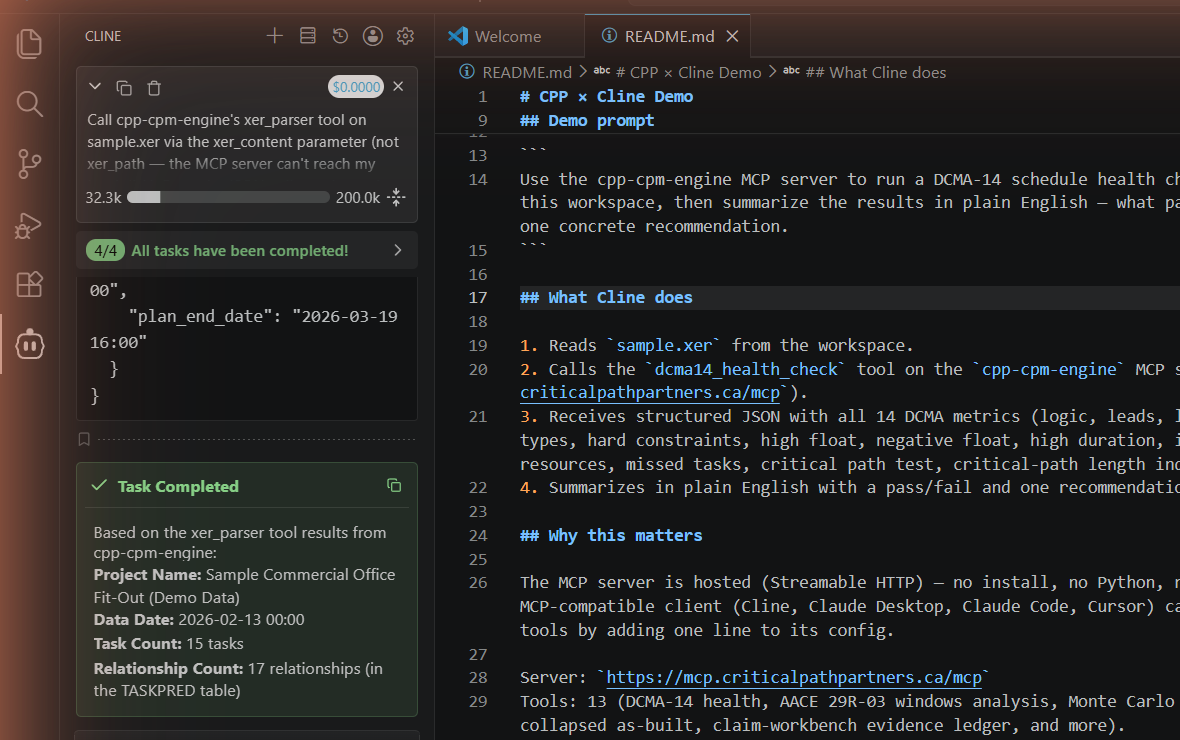
xer_parser from cpp-cpm-engine. Captured during a real run; full Cline panel + workspace README shown.What actually happened: Cline read the file contents from the workspace, sent them to the hosted MCP at mcp.criticalpathpartners.ca/mcp, the server parsed the XER and returned a structured JSON with the table summary, and Cline narrated four fields from that JSON in plain English. Total elapsed time: about ten seconds. Total per-token cost: $0.00. The LLM ran on the user's Max subscription via Cline's Claude Code provider, and the MCP server is free.
This is not a chatbot interpreting an XER. The MCP server runs the actual parsing code, the same code that powers every CPP forensic deliverable. The AI orchestrates. The methodology executes. The numbers come back grounded.
Setup in 30 Seconds
Every MCP client has a config file. The entry is the same shape every time: a name, a transport type, and the URL.
Cline (cline_mcp_settings.json)
{
  "mcpServers": {
    "cpp-cpm-engine": {
      "type": "streamableHttp",
      "url": "https://mcp.criticalpathpartners.ca/mcp"
    }
  }
}
Cursor (~/.cursor/mcp.json)
{
  "mcpServers": {
    "cpp-cpm-engine": {
      "type": "http",
      "url": "https://mcp.criticalpathpartners.ca/mcp"
    }
  }
}
VS Code Copilot Agent (.vscode/mcp.json)
{
  "servers": {
    "cpp-cpm-engine": {
      "type": "http",
      "url": "https://mcp.criticalpathpartners.ca/mcp"
    }
  }
}
Claude Desktop
The new Claude Desktop wires custom MCP servers through the UI rather than the JSON config: Customize → Connectors → Add custom connector, paste https://mcp.criticalpathpartners.ca/mcp, save. The tool list populates automatically.
What You Get
Thirteen forensic tools, each tied to an AACE recommended practice or DCMA assessment criterion. Every output is a structured JSON return that an AI can summarize, a downstream tool can ingest, or a human can audit.
| Tool | What it does | AACE / DCMA Reference |
|---|---|---|
xer_parser | Parse a Primavera P6 XER, return table summary + project metadata | n/a |
dcma14_health_check | 14-point schedule health assessment, baseline vs current | DCMA 14-Point |
forensic_windows_analysis | Per-window critical-path comparison across baseline + current | AACE 29R-03 MIP 3.3 |
time_impact_analysis_fragnet | Prospective fragnet insertion + forward-pass impact | AACE 52R-06, 29R-03 MIP 3.7 |
collapsed_as_built | But-for collapsed-as-built modelling | AACE 29R-03 MIP 3.8 |
concurrent_delay_matrix[pre-publication] | Per-window per-party concurrency matrix | AACE 29R-03 §3.3.I · §4.2; SCL Protocol §10 |
woet_classifier[pre-publication] | Worked-vs-On-time Execution Timeline: per-day execution classifier (Progress/Gain/Extended/Void) | AACE 29R-03 §3.3 windows enhancement |
slip_velocity[pre-publication] | Slip-rate trend with critical/non-critical decomposition | n/a |
critical_path_validator | False-criticality detection + constraint audit | AACE 49R-06 |
path_explorer | Driver-chain trace: why is this activity critical? | AACE 49R-06 |
monte_carlo_p50_p80 | Monte Carlo SRA with P50/P80, sensitivity tornado | AACE-style SRA (general probabilistic CPM) |
qramm_maturity | QRAMM-aligned maturity reading (five levels: Reactive / Ad-hoc / Centralized / Dynamic / Adaptive) | AACE 122R-22 |
claim_workbench_evidence_ledger | Multi-evidence forensic ledger from a folder of XERs + correspondence | n/a |
Why This Matters
Construction lawyers, project managers, and claims consultants are using AI assistants as their default research interface now. When the lawyer asks the AI to "run a DCMA-14 health check on this XER and tell me which schedule looks defensible," the tools that are wired into MCP get called. The tools that exist as a PDF whitepaper on a consulting firm's website do not.
Until this week, the answer to that question was no AI assistant can do this: the analysis had to be run by hand or in a separate tool. Now the answer is one URL in your config, results in fifteen seconds, structured JSON you can audit. The expert opinion still requires the expert. The rote work that gets the expert to the opinion does not.
What This Doesn't Replace
Same line as every other AI-in-construction piece on this blog: the methodology executes, the AI orchestrates, the human decides. dcma14_health_check can tell you that 31% of activities lack predecessors. It cannot tell you whether the contractor's narrative about why is credible. forensic_windows_analysis can attribute critical-path drift to specific activity codes within a window. It cannot tell a hearing panel which party should bear that drift under the contract.
The MCP server is the rote-work layer: XER parsing, metric computation, AACE-canonical attribution math, audit-trail generation. The forensic analyst's judgment, expert qualification, courtroom credibility, and contract interpretation sit on top of that layer. The faster the rote work runs, the more time the analyst has for the parts that matter.
Wire it into your AI session. See what comes back.
Drop the URL into your MCP client config and ask your AI assistant to call dcma14_health_check on a real XER. Or skip the wiring and open your schedule in CPP Lens, the free in-browser P6 viewer.